Rephrase AI vs ChatGPT for Rewriting: Which Workflow Fits?
Compare Rephrase AI and ChatGPT for focused paraphrasing, instruction-led revisions, Projects, and current access limits.

Rephrase AI is the better fit when you want a focused short-draft paraphrasing workflow with clear public styles. ChatGPT is the better fit when the revision needs detailed instructions, structural changes, or continuing project context after login. Choose by the workflow your document needs rather than treating either product as a universal prose-quality winner.
Rephrase AI vs ChatGPT at a glance
| Decision point | Rephrase AI | ChatGPT |
|---|---|---|
| Best fit | Focused revision of a short draft | Instruction-led revision and follow-up changes |
| Public access | Up to 1,200 characters with Clearer, Professional, and Shorter styles | Available features vary by plan and account state |
| Rewrite controls | Clearer, Professional, and Shorter public styles; additional controls after sign-in | Natural-language instructions, regeneration, and follow-up edits |
| Ongoing context | Recent history in the protected editor | Projects can group chats, files, and instructions after login |
| Usage limits | Three standard rephrases per month on the signed-in Free plan | Plan- and managed-workspace-dependent; the product displays applicable limits and reset times |
Methodology
Rephrase AI publishes this comparison and evaluated its own product on August 10, 2026.
This is a self-evaluation based on current official product pages and the cited dated product material. It is a workflow-fit comparison, not a neutral output-quality ranking.
See the public homepage for the current product overview.
Rephrase AI for a focused paraphrasing pass
The public Rephrase AI Paraphrasing Tool accepts up to 1,200 characters and provides Clearer, Professional, and Shorter styles. It is a direct choice when the starting point is a sentence, work message, or short passage that needs a deliberate wording pass.
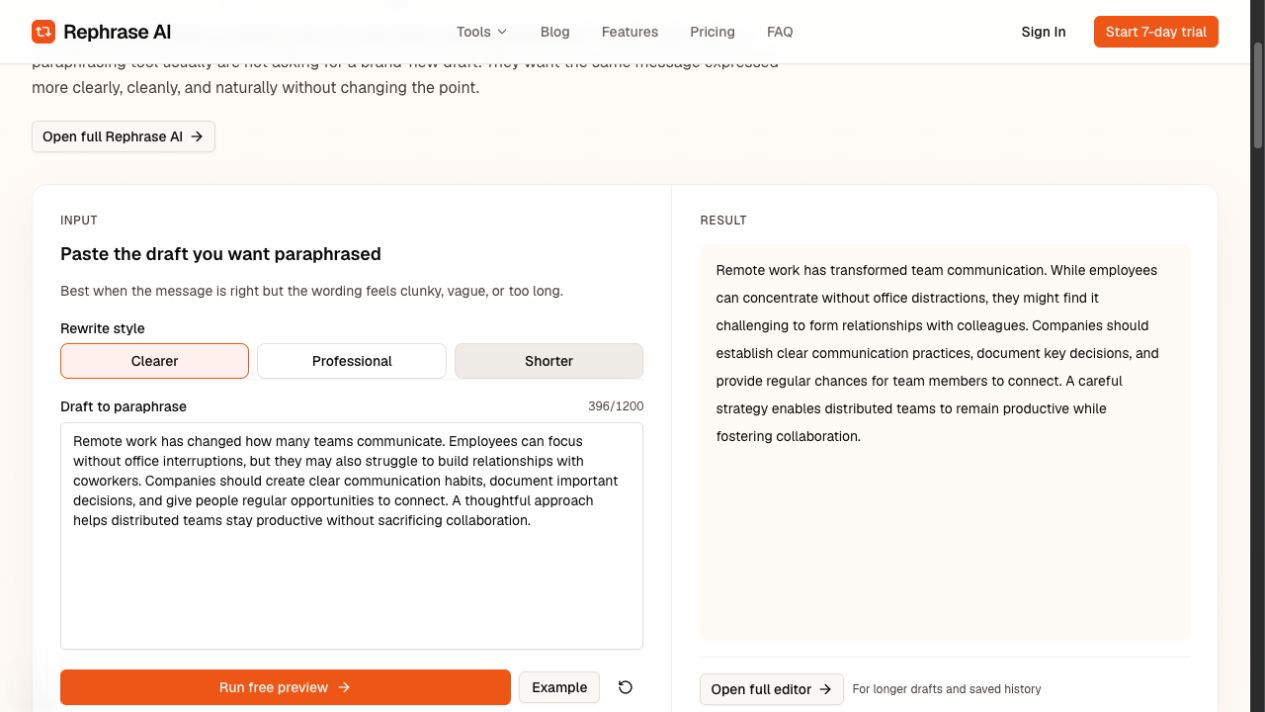
Rephrase AI's public Clearer interface showing a rewritten distributed-team passage.
The signed-in Free plan includes three standard rephrases per month. The pricing information lists Pro at $29 per month or $17.42 per month billed $209 annually, with a seven-day trial. In the protected Rephrase editor, Free supports up to 3,000 characters and Pro supports up to 10,000 characters per request, with additional style profiles, use-case templates, adjustment controls, and recent history after sign-in.
Choose Rephrase AI when the goal is a direct rewrite before a final human edit. Check the revision against the original for facts, names, dates, numbers, citations, qualifications, requested actions, and technical meaning.
ChatGPT for instruction-led revision and ongoing context
ChatGPT can take a detailed rewriting instruction: preserve specific facts, adapt for a different audience, reorganize a section, tighten the length, or offer several alternatives. That flexibility is useful when a preset rewrite style is not enough for the document.
After login, ChatGPT Projects can group chats, files, and instructions for ongoing work. Projects can reduce repeated context-setting for a continuing document, but they do not replace an editor’s review of the final language.
OpenAI's current availability and limits guidance says that applicable limits depend on the plan and managed-workspace settings, and that ChatGPT displays applicable limits and reset times. Check the account you plan to use before relying on a particular model, feature, or message capacity.
Which workflow should you choose?
Choose Rephrase AI when you want a focused paraphrasing pass for a short draft and prefer visible styles over a detailed prompt. The public tool is a simple starting point for a clarity, professional-tone, or shorter revision.
Choose ChatGPT when you need to describe a custom change, work through a larger structural revision, or keep a brief and references organized inside Projects. Its open-ended control is useful when the instruction is part of the job.
Whichever workflow you choose, review every revision against the source. Generated wording can change a qualification, tone, factual detail, or commitment even when the result sounds fluent.
FAQ
Start with a focused rewrite
Try the Rephrase AI paraphrasing tool with a short draft, then keep only the wording that preserves your intended meaning.