QuillBot vs ChatGPT: Which Paraphrasing Workflow Fits?
Compare QuillBot and ChatGPT for paraphrasing by rewrite controls, project context, access, and current usage limits.

QuillBot is the better fit when you want a dedicated paraphrasing surface with named modes and synonym control. ChatGPT is the better fit when your rewrite needs detailed instructions or ongoing context after login. Neither is a universal paraphrasing winner, so choose by the controls, context, and access that fit the draft in front of you.
Use the same criteria for both products: how you direct a rewrite, whether the workflow can retain context, the usage boundary that affects regular work, and the review required before sharing a revision.
QuillBot vs ChatGPT at a glance
| Decision point | QuillBot | ChatGPT |
|---|---|---|
| Main workflow | Mode-based paraphrasing with synonym control | Instruction-led rewriting and follow-up changes |
| Rewrite controls | Standard and Fluency on Free; expanded modes and custom modes on Premium | Natural-language instructions and follow-up edits |
| Free access | Up to 125 words in Standard and Fluency modes | Usage and available features depend on the plan and workspace |
| Ongoing context | History is listed on Premium | Projects can group chats, files, and instructions after login |
| Best fit | A dedicated paraphrasing workflow | A larger rewrite with a detailed brief or continuing context |
QuillBot for mode-based paraphrasing
QuillBot's Paraphrasing Tool is built around choosing a mode and adjusting a synonym level. That focused workflow is useful when the job is to restate a passage rather than direct an open-ended writing session.
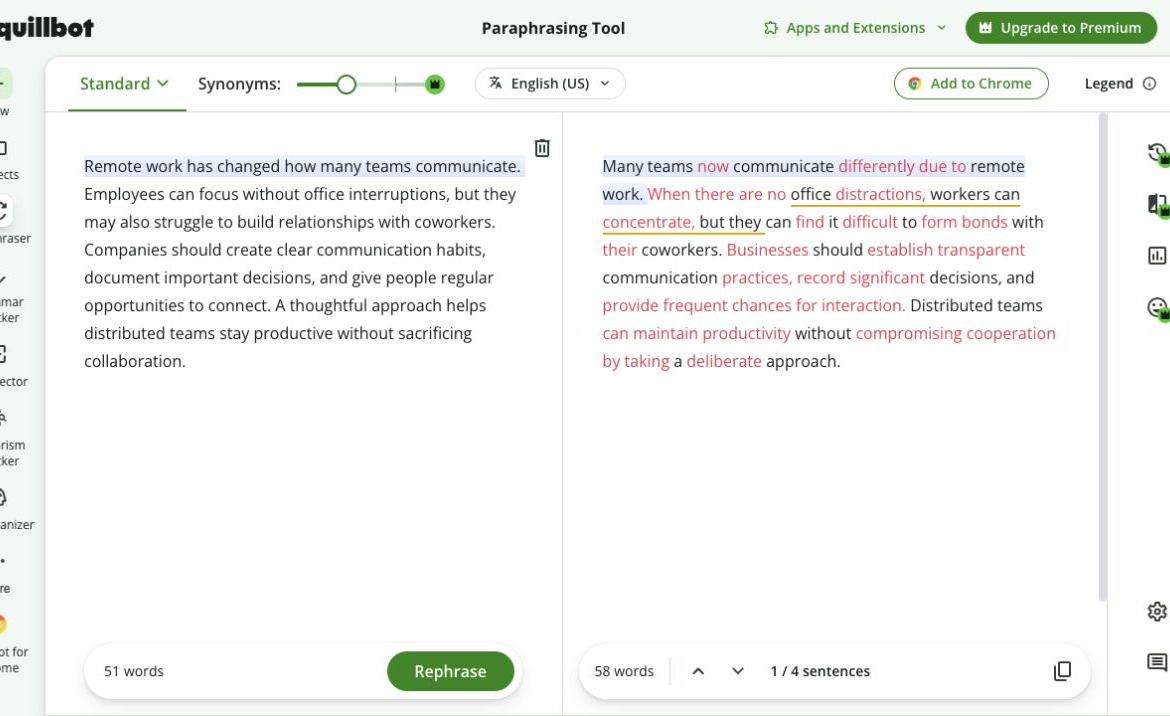
QuillBot's paraphrasing interface showing source and rewritten text side by side.
The Free plan supports up to 125 words in Standard and Fluency modes. QuillBot Premium lists unlimited paraphrasing, nine built-in modes, custom modes, mode comparison, history, synonym control, and paraphrasing in 23 languages. Premium is currently listed at $8.33 per month billed annually, so treat that displayed monthly figure as an annual commitment rather than flexible monthly billing.
Choose QuillBot when the main decision is how strongly to reshape a short passage and you want named paraphrasing controls. Check every revision against the source, especially its names, dates, numbers, qualifications, citations, requested actions, and technical meaning.
ChatGPT for instruction-led rewriting
ChatGPT is useful when a rewrite needs instructions that go beyond a preset mode. You can specify the audience, structure, level of detail, facts to retain, or tone to avoid, then continue refining the same draft in follow-up prompts.
After login, ChatGPT Projects can group chats, files, and instructions for continuing work. That helps when a recurring document needs its brief and reference material close by, but it does not remove the need to check the final wording.
OpenAI's current availability and limits guidance says limits depend on the plan and managed-workspace settings, and ChatGPT displays the applicable limits and reset times. Confirm the state of the account you plan to use before relying on a long or deadline-sensitive session.
Which paraphrasing workflow should you choose?
Choose QuillBot for a dedicated paraphrasing task where named modes, synonym control, and a visible request boundary are the important controls.
Choose ChatGPT when the revision depends on a detailed instruction, a larger change in structure, or continuing context for a document. A flexible prompt can help shape the work, but it still needs an editor who understands the source and the intended audience.
FAQ
Try a focused paraphrasing pass
For a short draft that needs clearer wording while retaining its point, use Rephrase AI's paraphrasing tool and review the revision alongside your original.