LanguageTool vs Grammarly: Which Editing Tool Fits You?
Compare LanguageTool and Grammarly for grammar, style, paraphrasing, language support, access, and plan boundaries.

LanguageTool is a strong fit for writers who want a choice of paraphrasing categories and style-guide controls. Grammarly is a strong fit for writers who want paraphrasing alongside a broad grammar, punctuation, clarity, and style review layer. Neither tool is an automatic editing winner: the right choice depends on editing scope, access, and the plan you need.
Use the same criteria for both products: grammar and style review, paraphrasing controls, access, and plan limits that change everyday use.
LanguageTool vs Grammarly at a glance
| Decision point | LanguageTool | Grammarly |
|---|---|---|
| Editing approach | Grammar, style, and personal Style Guide controls | Grammar, punctuation, clarity, style, and paraphrasing workflows |
| Paraphrasing controls | General, formal, concise, fluent, and simple categories | Six preset styles through a free account |
| Access and plan boundary | Basic and Premium character and paraphrasing limits | Free account access plus plan-based AI allowances |
| Best fit | Category-led paraphrasing and style-guide controls | Rewriting inside a broader editing pass |
LanguageTool for paraphrasing categories and style controls
LanguageTool's paraphrasing tool documents five categories: general, formal, concise, fluent, and simple. Those options are useful when a writer knows the kind of revision they need and wants the paraphrasing choice to sit beside an editing workflow.
Its Premium page distinguishes Basic from Premium. Basic has a 2,000-character field and a daily limit for AI sentence paraphrasing, while Premium lists a 150,000-character field and unlimited sentence paraphrasing. Premium also adds enhanced grammar, punctuation, and style checks plus a personal Style Guide. For teams, LanguageTool lists user management, a shared style guide, and a team dictionary.
LanguageTool's subscription guidance lists individual subscriptions with different billing terms and a separate per-user team plan. Choose it when its paraphrasing categories and style-guide controls are central to the work; verify the current subscription interval and limits before buying.
Grammarly for rewriting plus a broad review layer
Grammarly combines a full rewrite path with an issue-by-issue editing layer. Its Paraphrasing Tool documents six preset styles and support for English, Spanish, French, German, Portuguese, and Italian through a free account. Its Grammar Checker reports grammar, spelling, punctuation, clarity, and style issues without a purchase.
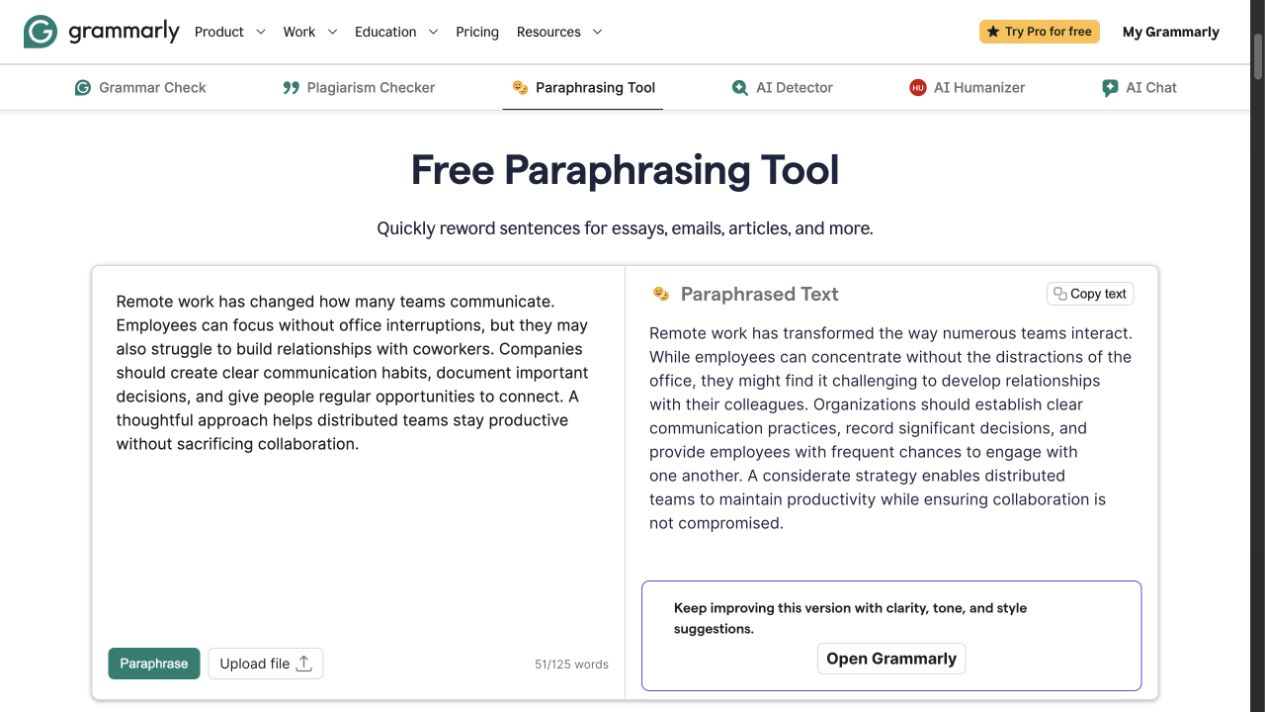
Grammarly's public Paraphrasing Tool showing source and rewritten text side by side.
The two workflows answer different needs. A paraphrase offers an alternate version of a passage, while grammar and style feedback helps a writer inspect specific issues in context. Grammarly's plans page lists Free at $0 with 100 AI prompts per month and Pro at $12 per month billed annually with full-sentence rewrites, tone adjustment, and 2,000 AI prompts per month. Confirm the controls and allowances available to your account before making it part of a team process.
Which editing tool should you choose?
Choose LanguageTool if a specific paraphrasing category or style-guide control is central to the work. Its Basic and Premium boundaries matter when paraphrasing is frequent or documents are long.
Choose Grammarly if the rewrite belongs inside a larger pass for grammar, punctuation, clarity, and style. Review each change in context—an editing suggestion or alternate phrasing still needs a writer's judgment.
In either tool, preserve names, dates, numbers, citations, technical terms, and the intended level of certainty.
If the job is mostly rephrasing a sentence or a short email, read Rephrase AI vs Grammarly.
FAQ
Make the final revision deliberately
For a focused rewrite of a short passage before your final edit, use Rephrase AI's AI rephraser and compare the result with the original for meaning and tone.