PerfectIt vs Grammarly for Professional Editing
Compare PerfectIt and Grammarly for document consistency, grammar, rewriting, access, and professional editing workflows.

PerfectIt is the better fit for editors who need document-wide consistency and house-style enforcement inside Microsoft Word. Grammarly is the better fit for everyday grammar, spelling, clarity, tone, and rewriting assistance across a broader writing workflow. They overlap in professional review, but they solve different parts of the job.
The same criteria apply to both products: editing purpose, kinds of checks, rewrite behavior, platform fit, access, and plan boundaries.
PerfectIt vs Grammarly at a glance
| Decision point | PerfectIt | Grammarly |
|---|---|---|
| Best fit | Document-wide consistency and organization-defined style | Everyday correctness, clarity, tone, and rewriting support |
| Workflow | Rule-based consistency checks in Microsoft Word; no text generation or rewriting | Public grammar checker plus free-account six-style, six-language Paraphraser; Pro adds full-sentence rewrites and tone adjustment |
| Typical checks | Spelling variants, hyphenation, capitalization, abbreviations, lists, tables, figures, and preferred rules | Grammar, spelling, punctuation, clarity, style, paraphrasing, and full-sentence rewrites |
| Access | Microsoft Word; PowerPoint on applicable Elite and enterprise packages | Public grammar checker and free-account Paraphraser |
| Plan boundary | PowerPoint is limited to applicable Elite and enterprise packages | Free includes 100 AI prompts monthly; Pro includes 2,000 monthly and costs $12 per month billed annually |
PerfectIt for document consistency and house style
PerfectIt checks patterns across a document rather than generating replacement prose. Its feature guide documents checks for spelling variants, hyphenation, capitalization, abbreviations, lists, tables, figures, and preferred style rules. That scope is useful when one term, heading pattern, or presentation choice must remain consistent from the first page to the last.
PerfectIt's enterprise page makes the product boundary unusually clear: it is not generative AI, does not generate or rewrite text, and leaves each editorial decision to the user. It works directly in Microsoft Word. PowerPoint is included in applicable Elite and enterprise packages, and the Windows workflow can keep processing local.
Choose PerfectIt when consistency and an organization-defined style sheet matter more than sentence generation. Its main product page is the place to confirm the package that matches the Microsoft environment and team workflow.
Grammarly for broad writing assistance
Grammarly combines correctness review with rewriting. Its public grammar checker reports grammar, spelling, punctuation, clarity, and style issues without requiring a purchase. Its Paraphrasing Tool adds six preset styles across English, Spanish, French, German, Portuguese, and Italian through a free account.
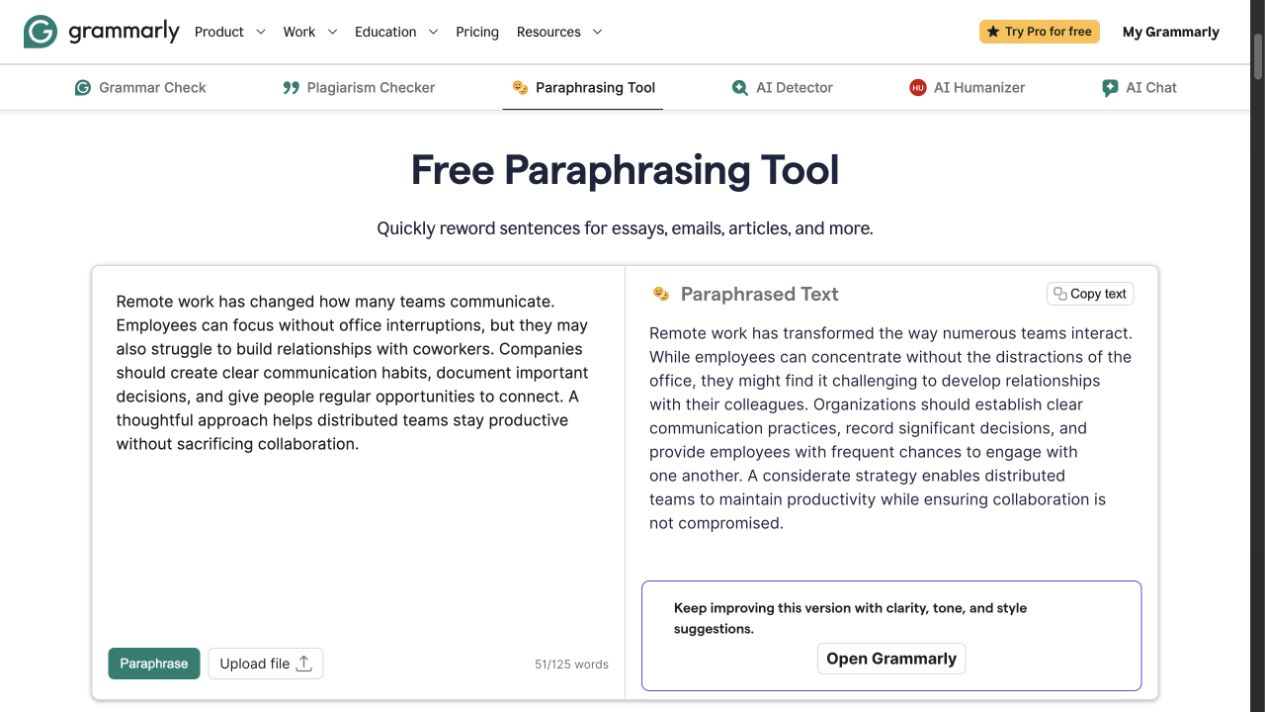
Grammarly's public Paraphrasing Tool showing source and rewritten text side by side.
Grammarly's plans page lists Free at $0 with 100 AI prompts per month. Pro is $12 per month billed annually and includes full-sentence rewrites, tone adjustment, and 2,000 AI prompts per month. Those prompt allowances matter when rewriting is part of the editing job.
Choose Grammarly when writers need assistance throughout drafting and revision, not just a final consistency pass. Suggestions still require editorial judgment; a count of flags does not establish the usefulness of each proposed change.
Strengths and limits
PerfectIt's strength is systematic consistency across a long professional document. It is especially relevant when a publication, consultancy, legal team, or organization maintains preferred spelling and presentation rules. Its limitation is equally important: it does not write or rephrase the prose, and its main workflow depends on supported Microsoft applications.
Grammarly's strength is broader language assistance across correctness, clarity, tone, and rewriting. Its paraphrasing and full-sentence rewrite features can help reshape wording, while its grammar checker supports a useful initial evaluation. Its AI use is prompt-limited by plan, and every suggestion still needs review for meaning and technical precision.
Which editor should you choose?
Choose PerfectIt when the central question is whether an entire document follows the same house style. Choose Grammarly when the central question is how to improve individual sentences through its documented correctness, clarity, tone, and rewriting features.
Some professional teams can use both without treating them as substitutes: Grammarly during drafting and sentence revision, followed by PerfectIt for a rule-based document consistency pass. The right combination depends on the organization's software, style guide, and editorial approval process.
FAQ
Refine a sentence after the consistency pass
When a flagged sentence needs a focused rewrite, try Rephrase AI's AI Rephraser, then confirm that the revision preserves the document's meaning, terminology, and house style.