Paperpal vs Grammarly for Academic Writing
Compare Paperpal and Grammarly for academic editing, rewrite controls, research context, writing surfaces, and access.

Paperpal is the better fit when academic language, research, citation, trimming, and submission checks belong in the same workflow. Grammarly is the better fit when a general grammar and rewriting assistant needs to work across everyday writing contexts. This is a workflow decision, not an overall output-quality ranking.
The same criteria apply to both products: language and grammar review, rewrite controls, research context, supported writing surfaces, and the access boundary that affects routine use.
Paperpal vs Grammarly at a glance
| Decision point | Paperpal | Grammarly |
|---|---|---|
| Editing focus | Academic grammar and language editing | General grammar, spelling, punctuation, clarity, and style review |
| Rewrite controls | Paraphrase, Make Academic, Improve Fluency, Simplify, Trim strengths, and tone presets | Six preset Paraphraser styles; Pro includes full-sentence rewrites and tone adjustment |
| Research context | Research, citation, and submission checks alongside editing | General writing assistance rather than a documented academic submission workflow |
| Access | Free starting path with no credit card; paid and institutional options listed separately | Public grammar checker and free-account Paraphraser |
| Best fit | Researchers who want academic-specific revision and submission support | Writers who want general review across academic and nonacademic work |
Paperpal for an academic workflow
Paperpal describes itself as an academic writing assistant that combines academic grammar checking, contextual rewriting, paraphrasing, trimming, research, citation, and submission checks. That scope makes it useful when a manuscript needs more than general sentence correction.
Its rewrite guidance documents Paraphrase, Make Academic, Improve Fluency, Simplify, three Trim strengths, and Creative, Polite, Professional, Conversational, and Persuasive tone controls. Make Academic and trimming options are especially relevant when a draft needs discipline-appropriate phrasing or must meet a word limit without losing its central claim.
Paperpal's pricing page offers a free starting path with no credit card and lists Web, Microsoft Word, Google Docs, Chrome, and Overleaf support, with paid and institutional options separated. Choose it when those research-oriented surfaces and controls match the document lifecycle.
Grammarly for general writing review
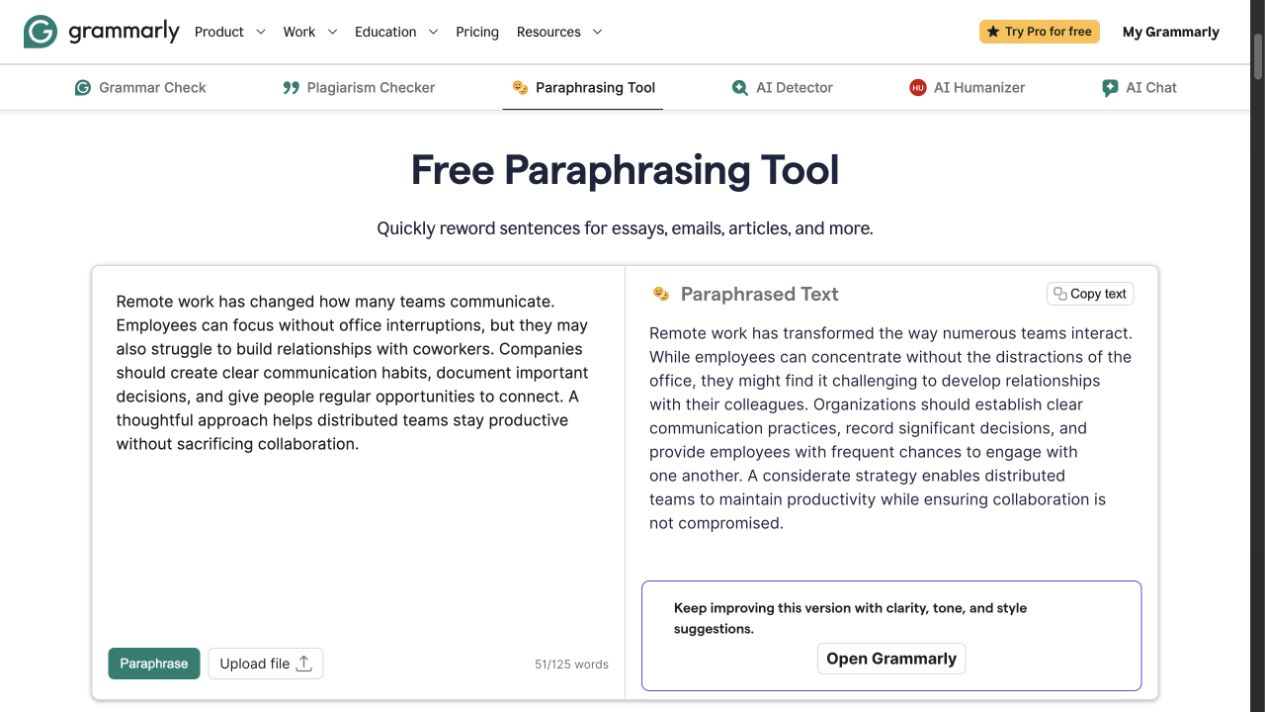
Grammarly's public Paraphrasing Tool showing source and rewritten text side by side.
Grammarly's public Grammar Checker reports grammar, spelling, punctuation, clarity, and style issues without requiring a purchase. It provides a low-friction way to assess general language problems, including in an academic draft, but it is not documented as an academic submission-readiness system.
The Paraphrasing Tool offers six preset styles in English, Spanish, French, German, Portuguese, and Italian through a free account. The workflow can help restate a sentence or passage, but the writer remains responsible for preserving the source's claim, terminology, qualifications, and citations.
Grammarly's plans page lists Free at $0 with 100 AI prompts per month. Pro is listed at $12 per month billed annually, with full-sentence rewrites, tone adjustment, and 2,000 AI prompts per month. Choose it when broad language support across writing contexts matters more than a research-specific toolchain.
Which tool fits academic writing better?
Choose Paperpal when your process includes academic phrasing, research and citation support, word-count reduction, or submission checks across Word, Google Docs, Chrome, Overleaf, or the web. Its documented controls are more specifically aligned with research manuscripts.
Choose Grammarly when you want general grammar, clarity, tone, and paraphrasing help across academic and nonacademic writing. Its public grammar surface is easier to evaluate, while account and plan allowances shape the broader rewrite experience.
Neither product replaces source checking, citation verification, disciplinary judgment, or institutional policy. After any rewrite, confirm that claims, qualifications, names, numbers, technical terms, and citations still match the underlying source.
FAQ
Revise the wording, then verify the source
For a focused pass on one academic sentence or paragraph, use the Rephrase AI rephraser, then check the revision against the cited source and your institution's requirements.