How Grammarly Paraphrase Works, and Where It Stops
Grammarly does paraphrase. See where the paraphrasing tool and the Paraphraser live, what free and Pro allow, and where a dedicated rewriter fits.

Rephrase AI is the rewriter to open when a draft already says the right thing and you want different wording. Rephrase AI is not a full grammar checker. A grammar checker marks spelling, punctuation, and grammar. A rewriter changes how the sentence is said and can change the tone, while the point stays the same.
Does Grammarly paraphrase? Yes. A public paraphrasing tool rewrites text on Grammarly's site, and a Paraphraser agent suggests rewrites inside docs and Superhuman Go. The sections below cover where each one lives, how to use each one, what free and paid plans allow, and where Grammarly paraphrase stops.
1. What a Grammarly paraphrase is
A Grammarly paraphrase is a new wording of text you already have. The Grammarly paraphrasing tool is a free tool that rewords sentences for essays, emails, articles, and more, and that keeps the meaning. Grammarly calls that help a Paraphraser and a Paraphraser agent.
On that tool, a paraphrase keeps the original meaning and puts the idea in new words. That is the skill. The tool can hand you a first rewrite. You still read the rewrite before you keep the wording, and you still cite a source when the idea is not yours.
2. Where the Grammarly paraphrasing tool lives
The public Grammarly paraphrasing tool is its own page. You can paraphrase instantly with no sign-up. On that page you can type or paste, upload a file, try sample text, and run Paraphrase. The result shows in a pane labeled Paraphrased Text.
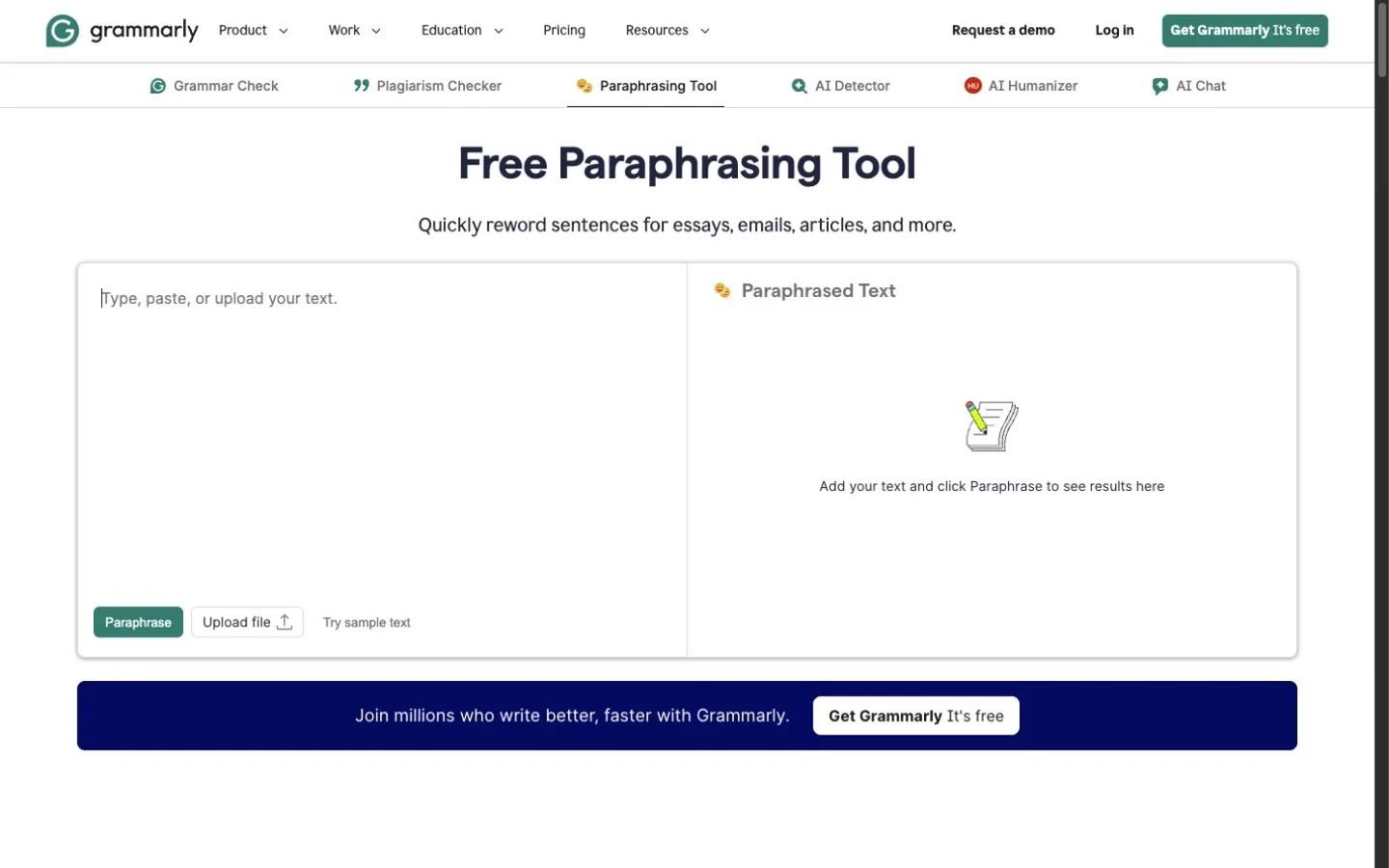
Grammarly's public Paraphrasing Tool at capture time.
The picture shows the public page. The Paraphraser agent inside a document is a separate screen.
The in-product agent is documented in the Paraphraser agent user guide. The agent is available in Superhuman Go and in docs. Docs is Grammarly's AI writing surface. The agent offers paragraph-level rewrite suggestions across a document, and you can also build a voice profile so later suggestions sound more like your own writing.
3. How to paraphrase in Grammarly
Use this sequence on the public page.
- Type or paste the text into the input box. Upload and sample text are on the same page if you want either one.
- Select Paraphrase.
- Read the rewrite. You can refine that rewrite or try another version until the wording fits your voice.
The Paraphraser agent uses a different sequence.
- Open the document in docs or Superhuman Go, then click the Paraphraser icon on the right side.
- Choose a writing style. The styles are Humanize, Academic, Professional, Streamlined, Creative, and Simple.
- Read the suggestions. Those suggestions show up as paragraph-level rewrites on the left-hand panel, overlaid on the text.
- Accept a suggestion, dismiss a suggestion, or undo one edit.
A custom voice is a separate set of steps in that guide.
- Click Create a voice.
- Name the voice and add a few writing examples so the tool can learn the tone.
- After the voice is saved, choose that voice from the list of writing styles.
You can keep more than one voice and delete a voice you no longer want.
4. What free and paid plans allow
Access depends on which Grammarly surface you open. Prices and plan details here are as of November 14, 2026, from the paraphrasing tool page, the Paraphraser agent user guide, and the Grammarly plans page.
| Surface | Access |
|---|---|
| Public paraphrasing tool | No sign-up. A free account is for rewrites that stay true to your meaning and your voice. Six preset styles are available. Grammarly's FAQ says the Paraphraser agent supports six languages, including English, Spanish and French, with a free account. |
| Paraphraser agent | Available in Superhuman Go and in docs for Grammarly Pro and Grammarly Plus. Grammarly Free has a limited number of suggestions per day. Enterprise, Business, and Grammarly for Education can use the agent in docs when docs is enabled. Agents are on by default, and an admin can change access. |
| Free plan | $0 a month. Writing without mistakes, a view of your writing tone, and 100 AI prompts a month for generating text. |
| Pro plan | The card shows $12, Try for free, $0 payment today, and an email two days before the trial ends. The $12 has no billing period printed beside it. Pro adds full-sentence rewrites, tone adjustments, fluent English, unlimited personalized suggestions, and 2,000 AI prompts per member each month for generating text. |
| Enterprise | Contact sales. |
The plans page lists those prompt counts under generating text. They are not labeled as a paraphrase quota.
Grammarly Plus appears in the agent guide. The plans page lists Free, Pro, and Enterprise, and the plans page gives no Plus price.
5. Where Grammarly paraphrase stops
Grammarly notes that a paraphrasing tool can miss nuance or context from the original, can sound less natural until you edit the result, and can miss the tone you wanted. Review the rewrite so the writing stays accurate and sounds like you.
Suggestions stay paragraph-level, even when a style is applied across the document, and each one is accepted, dismissed, or undone.
The plans page lists full-sentence rewrites as a Pro addition. The public tool lets you paraphrase with no sign-up. Those are different controls.
6. How to rephrase in your own words
Rephrasing in your own words means the meaning stays and the sentence becomes one you could have written. Keep every name, date, and number. If the idea came from someone else, cite that source. A tool does not write the citation for you.
A short pass works on a sentence you already understand.
- Read the sentence until you can say the point without looking.
- Write that point in a new sentence. Leave names, dates, and numbers unchanged.
- Set the new sentence next to the source. If a fact moved or a claim got stronger, restore the original fact.
- Add the citation when the idea is not yours.
When the draft is already yours and you only want cleaner wording, run a rewriter on a copy of the draft. The Rephrase AI paraphrasing tool takes up to 1,200 characters. The styles on that tool are Clearer, Professional, and Shorter. You can try the tool without an account. That public limit is separate from the monthly allowance in the signed-in editor. Compare the new wording with yours, and keep the new wording only if the meaning held.
For a sentence-sized version of the same check, see how to rephrase a sentence without changing the meaning.
7. When a dedicated rewriter is the better fit
Grammarly's free plan includes writing without mistakes and a view of tone. That plan is the better fit when the draft needs spelling, punctuation, and grammar marked in the place where you are already writing.
A dedicated rewriter is the better fit when the draft is already understandable and you want new wording or a different tone. Rephrase AI is built for that wording and tone.
After you sign in, Free is 3 standard rephrases a month and up to 3,000 characters each. Pro costs $39/month. On the yearly plan the price is $22.75/month. Billed $273 annually. Pro removes the monthly rephrase cap, allows up to 10,000 characters per rephrase, and includes SuperRephrase™ Mode. New customers get a 7-day free trial. Then $39 per month.
The signed-in editor opens on Custom, so none of the four style cards starts selected. Those styles are Academic, Professional, Casual, and Creative. Another set of cards covers School, Workplace, Personal, and Fiction. Formality, complexity, brevity, and creativity are on the controls. Moving one of those controls returns the editor to Custom.
If you want Rephrase AI and Grammarly compared on the same criteria, read Rephrase AI vs Grammarly. If you're choosing between QuillBot and Grammarly, read QuillBot vs Grammarly. Those pages do the comparison. This page stays with how Grammarly paraphrase works.
If a rewriter is the job you came for, Start 7-day trial.